Creating a presentation isn't the expensive part. It's creating the same presentation, every month, every quarter, for every client. The monthly management report, the project steering committee, the quarterly sales review, decks that always follow the same structure, the same slides, but with different data each time. And every time, two to four hours of work to update the numbers, realign the charts, fix the formatting.
Claude Code, Anthropic's CLI, offers a different approach through its PPTX Skill: you provide your .pptx template and your data, Claude Code generates a deck that conforms to your brand identity. Not a generic AI design. Your template, your fonts, your colors, your layouts. Here is what that looks like in practice, where the real limits are, and who actually gets value from it.
The Real Problem: Recurring Decks, Not One-Off Creation
Most guides on "creating a presentation with AI" talk about generating a deck from scratch, on a new topic, in two minutes. That is not the problem SMEs and mid-market companies actually face.
The real problem is recurring volume: the monthly activity report that has followed the same outline for three years, the quarterly client review with the same sections (progress, risks, next steps), the weekly sales summary for the exec team, the project pitch you reproduce for every new client.
In these cases, standard AI creation solves nothing. Gamma produces a generic design. The Claude.ai interface outputs a basic PPTX that ignores your brand guidelines. Copilot in PowerPoint helps you draft text but doesn't understand your template. You start from zero every time, or you spend as much time correcting as you would have spent creating.
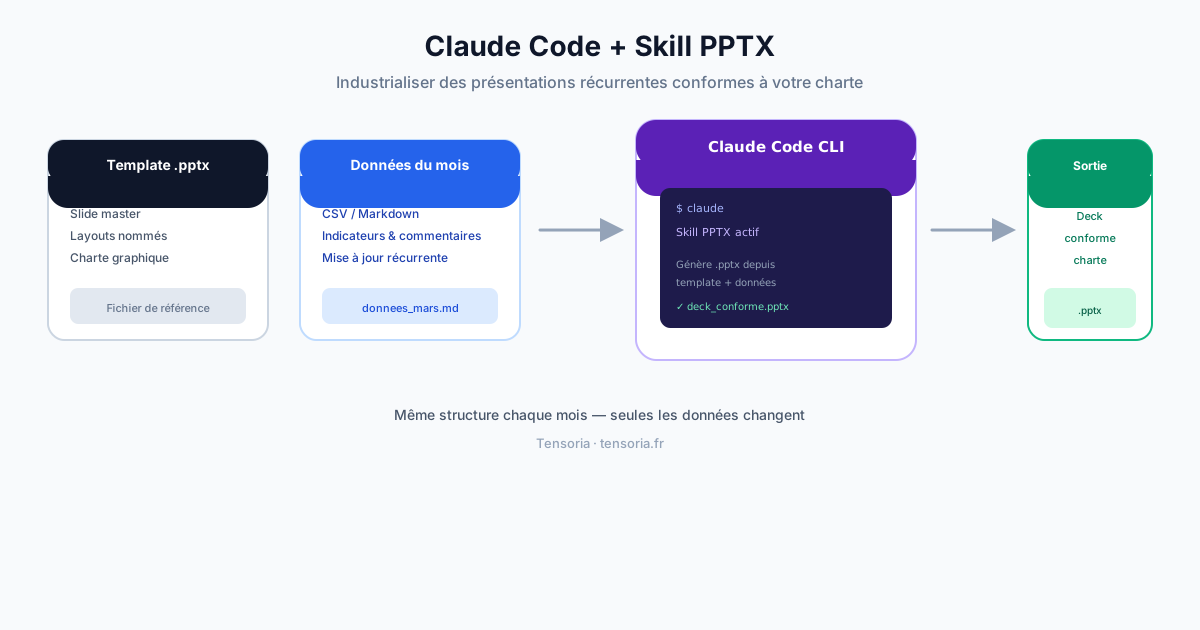
Claude Code takes a different approach: instead of generating a presentation from nothing, it reads your existing template and produces a new deck modeled on it. The difference between a designer who invents a style and an assistant who respects your visual identity.
Claude Code and the PPTX Skill: What They Actually Are
Claude Code is Anthropic's CLI (command-line tool). Unlike the Claude.ai interface, Claude Code is designed for technical and automated use: it runs in a terminal, integrates into scripts, and can be triggered programmatically.
A Skill in the Claude Code ecosystem is a packaged capability: a set of instructions and behaviors that enable Claude to accomplish a specific type of task. The PPTX Skill encodes the knowledge needed to work with PowerPoint files: reading a slide master, understanding layouts, respecting fonts and colors, injecting data into placeholders.
Available since February 11, 2026
Document Skills (PPTX, DOCX, XLSX, PDF) are enabled by default in Claude Code once file creation is activated. Available on all Claude plans since February 11, 2026. Limit: 30 MB per file. No third-party library installation required. Felo Slides is an alternative community-built Skill that offers similar functionality with additional customization options.
There is also Claude for PowerPoint, an add-in that installs in the PowerPoint ribbon. It is a solid tool for modifying slides in context without leaving the interface. But it does not support automation: you must trigger each action manually. For industrializing the production of recurring decks, Claude Code CLI is the right approach.
The Core Use Case: Monthly Report from a Template
A concrete example. An industrial SME sends a monthly activity report to its shareholders. The deck is always 15 slides: executive summary, key figures for the month (revenue, margin, headcount), progress on strategic projects, risk flags, next steps. The structure never changes. Only the data changes.
With the Claude Code workflow:
- The .pptx template, your reference deck, with the slide master configured (fonts, colors, logos, named layouts). This file is provided once and never changes.
- The month's data, a Markdown or CSV file with the indicators, management commentary, and progress updates. This file changes each month and takes 15 minutes to prepare.
- The Claude Code command, an instruction that tells Claude to generate the report by reading the template and the data.
- The generated deck, a .pptx file that conforms to your brand, with the month's data injected into the corresponding slides.
What used to take 3 hours of formatting now takes 20 minutes of data preparation and 5 minutes of generation. The time savings are not in the thinking (you remain responsible for the substance) but in the mechanical, repetitive formatting work.
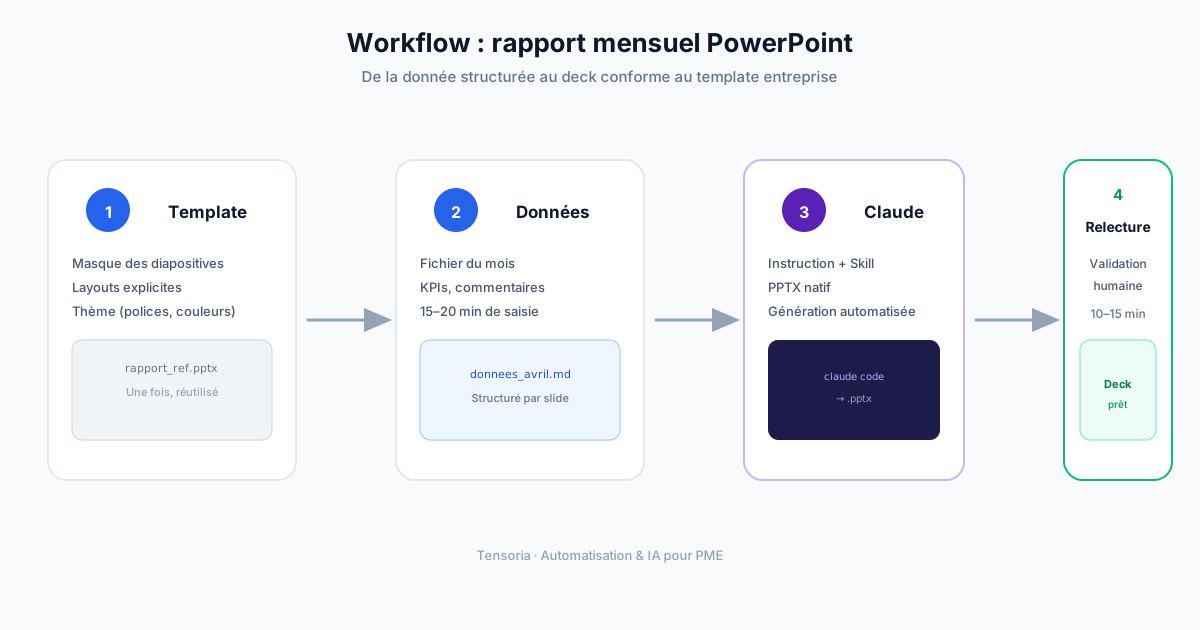
Concrete Workflow for an SME: From Data to Deck in 4 Steps
Here is how to set up this workflow in practice. Not a coding tutorial, just the business steps you need to understand before getting started.
Step 1: Prepare a solid .pptx template
This is the most important and most often neglected step. Claude Code will read your slide master: the fonts defined in the theme, the colors in the color scheme, the named slide layouts (title only, title + content, two columns, etc.). The more structured your template, the better the result.
Concretely: open your reference PowerPoint, go to View > Slide Master, name each of your layouts explicitly ("Slide_key_figures", "Slide_project_progress", "Slide_title"), and make sure your colors and fonts are defined in the theme, not applied manually slide by slide.
Step 2: Structure the input data
Claude Code can read Markdown, CSV, JSON, or plain text. For a monthly report, a Markdown file is sufficient:
- Report title and date
- Key indicators with their values and prior-month comparisons
- Management commentary by section (2 to 3 lines per slide)
- Risk flags and planned actions
This data file is what you prepare each month. It is your only data-entry task, everything else is automated.
Step 3: Write the Claude Code instruction
The instruction you give Claude Code specifies: which template to use, which data file to read, the mapping between data and slide layouts, and the output filename. You write this instruction once during setup, then reuse it at each occurrence.
Step 4: Review and final adjustments
Claude Code generates a first draft. A 10 to 15 minute human review is still necessary: verify that data is correctly placed, adjust an overlong title, confirm that the rendered charts match the intent. The goal is not to eliminate human review, but to eliminate the 2 to 3 hours of mechanical formatting work.
Brand Compliance: Why Claude Code Outperforms Gamma
This is the fundamental differentiator. Gamma generates a visually polished presentation starting from your description. But the starting design is a Gamma design, not yours. You can customize the colors, change the typography, adjust the layouts. But you are always starting from a generic design that you nudge toward your brand, never from your brand directly.
Claude Code does the opposite. It receives your .pptx file and reads the slide master: the primary and secondary fonts defined in the theme, the color scheme (accent colors, text colors, background colors), the available layouts and their structure, the margins and proportions defined by your designer. It does not invent a design. It respects yours.
What Claude Code reads in your .pptx
- The slide master and its named layouts
- The color scheme of the theme (6 accent colors, text, background)
- The fonts defined in the theme (heading and body)
- The placeholders and their position in each layout
- The fixed elements of the master (logo, footer, slide numbers)
For an SME or mid-market company that has invested in a brand identity, a logo, precise colors, a chosen typeface, a PowerPoint template signed off by management, this is the difference between a tool that honors that investment and one that ignores it.
Use Cases Where the ROI Is Real
Claude Code for presentations does not create value in every context. It creates a lot of value in specific situations.
The monthly or quarterly recurring report
Activity reports for management, financial summaries for shareholders, operational reviews for the exec team. Fixed structure, changing data, brand compliance required. This is the ideal use case: the time savings are immediate and repeat indefinitely.
The repetitive sales pitch
Many SMEs have a structured sales pitch they adapt for each prospect: one slide on the client's context, one on the proposed solution, one on relevant references, one on pricing. The structure is the same, the content varies per client. Claude Code can generate this personalized deck from a client brief in minutes.
The project steering committee
Steering committees often follow a standardized format: progress against plan, risk flags, decisions needed, actions for the next period. If your consulting firm or project management team produces these reports regularly, industrializing via Claude Code is worthwhile.
The quarterly client review
Agencies, consulting firms, and IT services companies produce quarterly reviews for each client. Same structure, different data. Claude Code can generate these decks from project tracking data while maintaining visual consistency.
What Claude Code Does Not Do Well : Honestly
Tensoria's approach means being as clear about limitations as about advantages. Here is what does not work, or works less well than you might hope.
Highly visual or creative presentations
If your deck relies on complex layouts, full-bleed images, photo composites, custom infographics, elaborate animations : Claude Code is not the right tool. It handles structural layouts, not creative graphic design. For this type of presentation, a designer or a tool like Canva is more appropriate.
The CLI learning curve
Claude Code is a command-line tool. For non-technical users, getting started takes a few hours. It is not insurmountable, but it is not as immediate as opening Gamma in a browser. If you have never used a terminal, set aside half a day to get comfortable before you are fully operational.
Fine formatting adjustments
Claude Code may place text in the wrong placeholder, generate a title that is too long for a slide, or miscalibrate spacing. Human review is still essential. The goal is to eliminate 80% of the formatting work, not to produce a perfect deck without any intervention.
API costs to factor in
If you use Claude Code in automated script mode (no human in the loop), you consume API tokens at each generation. For a 15-slide monthly report, the cost is modest (a few cents per generation). For high volume or long decks, this cost should be factored into the ROI calculation.
Output quality depends on the source template
A poorly structured .pptx template, no clean slide master, formatting applied manually slide by slide, no named layouts, will produce less reliable results. Output quality is proportional to the quality of the template provided.
Claude Code vs Gamma vs Manual PowerPoint: When to Use What
| Situation | Claude Code | Gamma | Manual PowerPoint |
|---|---|---|---|
| Recurring deck with a fixed template | Ideal. Respects the template, automatable | Possible but generic design every time | 2 to 4 hours of formatting per occurrence |
| One-off presentation on a new topic | Functional but overkill | Ideal. Fast, design included | Suitable when full control is needed |
| High-stakes pitch (investors, RFPs) | Good for a first draft, manual finishing required | Good for a quick first draft | Ideal. Pixel-level control |
| Highly visual or creative deck | Not suitable | Partial (AI design has limits) | Ideal, or dedicated designer |
| Automated generation from data | Ideal. Scriptable, integrable into pipelines | Possible via API Generate (Pro plan) | Not suitable without custom development |
Who Gets Real ROI
The concrete question is simple: do you regularly produce decks that follow a fixed structure and a precise brand template? If yes, the calculation is quick.
An operations manager who produces two monthly reports and one quarterly review spends on average 8 to 12 hours per month on PowerPoint formatting. With Claude Code, that drops to 2 to 3 hours (data preparation + review). Over a year, that is between 70 and 110 hours recovered from zero-value-add tasks.
Claude Code creates real ROI for:
- Operations leadership producing regular executive or board-level reports
- Consultants and advisory firms delivering recurring client reviews
- Sales teams adapting the same pitch for each prospect
- Project managers feeding steering committees with the same format
- IT services companies and agencies producing project reports for multiple clients simultaneously
On the other hand, if you produce a different presentation each month with no fixed template and no recurrence, Gamma or the Claude.ai interface will serve you better.

Anas R. · Data Scientist, Founder of Tensoria
I work on business process automation with AI for SMEs and mid-market companies. Industrializing recurring presentations is a use case I encounter constantly: hours lost to mechanical formatting, when the real value is in the analysis, not the layout. Claude Code solves this specific problem well.
Talk to us about your projectHow to Get Started with Claude Code and the PPTX Skill
Here are the pragmatic steps for testing the workflow on a real case. Budget half a day for the initial setup; after that, each generation takes 15 to 20 minutes.
Which subscription and which model?
The Pro plan at $20/month gives access to Claude Code, but it is often tight for presentation generation, you hit the limit quickly after 2 or 3 complex requests in a day. If you are producing decks regularly (a weekly report, several client reviews per month), the Max plan at $100/month is far more cost-effective and unlocks the Opus model, which is significantly better on complex tasks and longer presentations (15+ slides). Sonnet remains sufficient for short decks with a simple structure.
- Enable Claude Code, available from the Pro plan at $20/month (claude.ai) or via the Anthropic API. Install the CLI following the official documentation. Verify that file creation is enabled in settings.
- Prepare your .pptx template, open your reference deck and structure the slide master: name your layouts, verify that your fonts and colors are in the theme (not applied manually). A well-structured template is the key to a quality output.
- Create your test data file, a Markdown file with data from a fictional or last month's report. Structure it by section, matching your usual slides.
- Write and test your Claude Code instruction, start with a simple instruction: "Generate a PowerPoint file using the template [template_name.pptx] and the data from [data.md]. Follow the named layouts in the slide master." Iterate on the instruction until you get a satisfactory result.
If you want to go further, integrating this workflow into an automated pipeline, triggering generation from your project management tool, or connecting Claude Code to your data sources, that falls under business process automation, which requires technical support.
Frequently Asked Questions
Automate beyond presentations
Claude Code industrializes your decks. Connecting this workflow to your business data and integrating it into your existing processes is the next step.
Related Articles
- Claude for daily use: understanding the full Claude ecosystem before getting into Claude Code.
- Claude Cowork, the agentic office assistant: the same agentic engine applied to document tasks beyond slides.
- LLM integration: connecting Claude Code to your data pipelines and business tools.
- AI Audit: identifying which automation use cases are worth pursuing in your specific context.
- Official Claude Code documentation: the technical reference for getting started.
- Comparison of PPTX Skills for Claude Code CLI: including Felo Slides as a community alternative.
